1st Lecture:
==========
Why devops :
===========
to deliver application very speedly .
SDLC : software development lifecycle
1. planning 2. defining 3. designing 4.building 5. testing 6. deploying
devops lifecycle :
1.plan 2.code 3. build 4.test 5.deploy 6.release 7. operate 8. mointor
( for remambering the concept keep in mind pcb has a doctor whos name is TOM )
PCB
DR
TOM
***********************************************************************************
2nd lecture :
============
Software artitucture :
====================
1. one tier software
2. two tier software
3. three tier software
1. web server
2. app server
3 db server
1 .
one tier software is a standalone software
no need for internet connection to operate
example : VLC media player
2 .
two tier architecture : client server application
the app will work on local laptop
it will require an internet connection
example : banking application
3.
three tier web application
it invlove
web server
application server
db-server
******************************************************************************************
3rd lecture :
============
agneda : create a webserver and show the live environment
used AWS to create and ec2 machine to create the same web server as netflix have
after creating and accessing ec2 machine craete and script of vi netflix.sh and insert following lines into it and simply run it
—————————–
yum install httpd git -y
systemctl start httpd
systemctl status httpd
chkconfig httpd on
cd /var/www/html
git clone https://github.com/CleverProgrammers/pwj-netflix-clone.git
mv pwj-netflix-clone/* .
tail -100f /var/log/httpd/access_log
—————————————–
the code if get from below link
https://github.com/RAHAMSHAIK007/all-setups
******************************************************************************************
4th lecture :
============
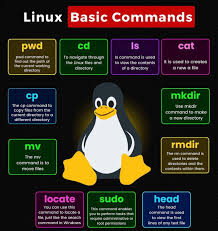
Linux basic commands :
====================
touch file : to create a file
ls -ltra : to show list of files
cat file1 : to show content of a file
cat>>file1 : to insert the content
enter ctl+d : to save and exit from file
touch file(1..100) : to create 100 files at a time
sed -n ‘5,15p ‘ file1 : to print only content from line1 to line 15 in the file file1
head -500f file1
tail -500f file1
wc file1
cat >>file1 :to save the content
cat file1 >>file2 : to copy content from file1 to file2 without earing data in file2 (with out overriding )
*******************************************************************************************
5th session :
===========
ViM/VI editor
============
There are three modes of vi editor
1. Command mode
2.insert mode
3. Save mode
———–
3. Save mode
——–
:w : to save
:q : to quit
:wq : save and quit
:wq! : save and quit forcefully
————————————-
2 . Insert mode
i : to insert command
A : to go to the end of line
I : to go to the start of the line
O : create new line above existing
o : to create new line below existing line
————————————-
1 . Command Mode
shift+g : to go to the end of the file ( last line of the file )
gg : to go to the top of the file ( first line of the file )
:set number : to show number of lines inside file
:n : to go to specfic line
yy : to copy a line
10yy : to copy 10 lines
p : to paste it
10p : to paste 10 lines
dd : to delete a line
u : to undo a action
/word : to search a specfic word
**********************************************************************************************************
7th session :
===========
Grep regular expression print
to search the word in file
grep raham file1 : to search word raham word from file1
grep raham file1 -i : to search word raham word from file1 (-i is used to avoid case senestive)
grep raham file1 -ic : to search word raham word from file1 (-c is for count )
| :pipe symbol : here 1st command is the input for 2nd command
cat file1 | grep raham :
————————————–
SED Stream editor
is used to replace word with another word
——————————————————-
User and group management in LInux :
————————————
useradd sajjad : to cerate a user in linux
cat /etc/passwd : to check users list in linux
passwd sajjad : to set password of user sajjad
ctl+d : to logout from current user
**********************************************************************************************************
check number of files in a directory in linux
===============================================
find . -type f | wc -l
Leave a Reply